

Why your resume gets rejected
(and what to do about it)
6 Minutes read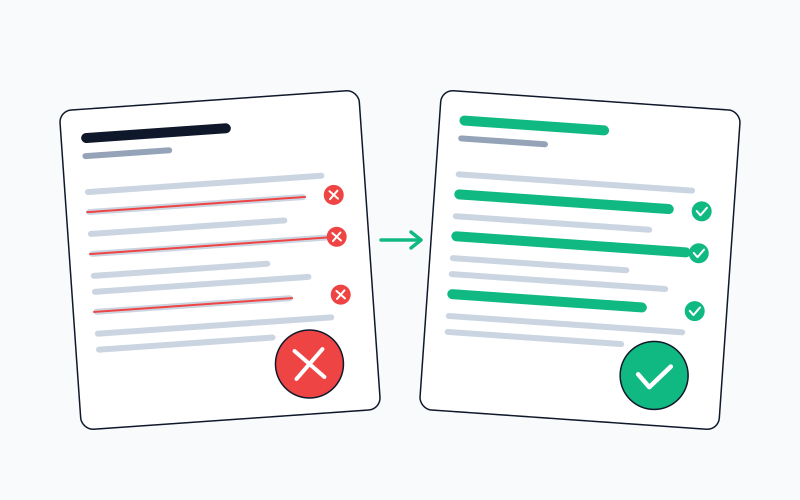
Most resumes get filtered out before a human ever sees them. Here's what actually happens and how to fix it.
You spent hours crafting the perfect resume. You're qualified. You're excited about the role. You hit submit and... nothing.
No rejection email. No interview. Just silence.
Here's what probably happened: your resume never made it to a human. It was filtered out by software before anyone could read it.
The Reality of Modern Hiring
Most companies use Applicant Tracking Systems (ATS) to manage job applications. These systems scan resumes for keywords, formatting, and other criteria before passing them along to recruiters.
Large companies receive thousands of applications per role. A widely-cited Ladders eye-tracking study puts the average initial recruiter scan at 6–7 seconds per resume. Whether that exact number holds today or not, the point is the same: the first pass is skim-speed, not reading-speed. Companies aren't trying to reject you, they're just drowning.
The question is: how do you make sure your resume survives?
What Actually Gets Filtered Out
1. Fancy Formatting
That creative template with columns, graphics, and custom fonts? ATS can't parse it. The system sees gibberish where you see design.
What to do instead: Use a single-column layout. Standard fonts (Arial, Calibri, Times New Roman). No tables, no text boxes, no headers/footers for important information.
2. Missing Keywords
Job descriptions are filled with specific terms the ATS is looking for. If your resume doesn't include them, it doesn't matter how qualified you are.
What to do instead: Read the job description carefully. Not to keyword-stuff, but to understand how the company describes the skills and experience they need. Use similar language where it honestly applies to you.
3. Wrong File Format
Older systems sometimes struggled with PDFs, which is where the "always use .docx" advice came from. That's mostly stale. Modern ATS platforms (Greenhouse, Lever, Workday, Ashby, and similar) parse PDFs as well as or better than .docx.
What to do instead: Both PDF and .docx are safe with current platforms. If the posting specifies a format, follow it. Otherwise PDF is fine, and usually preserves formatting better across systems.
The Honest Truth About "ATS-Optimized" Resumes
There's no magic formula. Every ATS is different. Taleo, Greenhouse, Workday, Lever: they all parse resumes differently and companies configure them differently too.
Don't try to game the system. Just make your resume clear, well-organized, and relevant to the actual role.
What Actually Matters
Be Specific About Your Impact
"Responsible for sales" tells recruiters nothing. "Grew territory revenue from $2M to $3.5M in 18 months" tells a story.
Numbers aren't always possible, but specificity is. What did you actually do? What was the result?
Match Your Experience to the Role
Every resume you send should be tailored to the specific job. Not fabricated, tailored. Emphasize the experience that's most relevant. De-emphasize what isn't.
This takes more time. That's the point. Sending 100 generic applications will get you worse results than sending 20 thoughtful ones.
Make It Scannable
Remember that 6-7 seconds? Recruiters aren't reading your resume, they're scanning it. Use clear section headers. Put your most impressive achievements near the top. Make the important stuff easy to find.
The Bigger Picture
Resume optimization matters, but the best resume in the world won't help if you're applying to jobs that aren't a good fit.
Apply to roles where your experience genuinely aligns. If you're mass-applying to 50+ jobs a day with the same resume, you're doing it wrong. Ten thoughtful applications beat a hundred copy-paste ones.
Common questions
Do all companies really use ATS?
Most medium and large companies do. Industry estimates put roughly 97%+ of Fortune 500 firms on some form of ATS, with a growing majority of European mid-market companies over 500 employees following suit. Smaller startups (under 50) often don't, which is one reason the cold-application channel looks different at that scale. If you're applying to very small companies, ATS is probably not the bottleneck.
What file format is safest for ATS?
Both PDF and .docx are safe on modern platforms (Greenhouse, Lever, Workday, Ashby, etc.). The old "always use .docx" advice is stale: it came from older ATS versions that choked on PDFs. Today, if the posting specifies a format, follow it; otherwise PDF is fine and preserves formatting better than .docx when your resume gets passed around.
Should I stuff keywords from the JD into my resume?
No. Modern ATSes increasingly do semantic matching, meaning they understand that "led a team of six" and "managed six direct reports" are the same. Keyword stuffing now reads as unnatural to the semantic model and to the human recruiter who gets the resume next. Use the JD's language where it honestly applies to your experience, not as keyword ammunition.
Does a visually fancy template break ATS?
Often yes. Multi-column layouts, text boxes, decorative icons, and non-standard fonts are the main culprits. If the ATS mis-parses your resume, your name might end up in the wrong field, or your experience section might appear as gibberish. A clean, single-column, standard-font resume is the safest starting point.
Should I include a photo?
In Anglo markets (US, UK, Ireland, Canada, Australia): never. In DACH markets (Germany, Austria, Switzerland): yes. The conventions vary sharply by country. See CV rules by country for the full breakdown.
Is it worth paying for an "ATS-optimized" resume builder?
It depends on what's actually in the box. Template-only builders (the kind that sell you a layout and an "ATS optimization" score made of keyword matching) usually aren't worth the subscription; the layout you can pull together in any decent editor, and the keyword tuning belongs at the per-role tailoring level, not as a global ATS score on your master resume. Tailoring tools (the kind that actually rewrite the resume per posting against the JD) are a different category, and the value scales with how many roles you apply to. See the job-search tool stack post for the breakdown.
For a deeper dive on how to tailor the same resume for different roles without rewriting it each time, see CV tailoring: what actually changes.
No spam. Unsubscribe anytime.
Related Articles
The recruiter screen: what the first call is really checking
The first call is short, but it filters more candidates than any other stage. What the recruiter is listening for, and how to answer the money question.
 Jobiz Team

Your employer made a counter-offer. Should you take it?
A counter-offer fixes the number, rarely the reason you looked. How to weigh one honestly, and how to turn it down without burning the bridge.
Jobiz Team
Take-home assignments: how much unpaid work is too much?
A fair take-home is a few hours, scoped, and reviewed by a person. How to tell a reasonable one from free consulting, and what to say when it isn't.
Jobiz Team